Zen Link™ Setup
This guide explains what Zen Link™ is, how it works with Cronus Zen, and why it is used for native PlayStation® 5 connectivity. It covers PS5 Native Mode, the benefits of using Zen Link™ instead of Remote Play or bypass methods, and why users should confirm whether they have Version 1 or Version 2 before continuing with setup.
What is Zen Link™?
Zen Link™ is a hardware accessory — a dedicated bridge that connects to your Cronus Zen and lets it communicate directly with a PlayStation 5 console.
Its headline capability is PS5 Native Mode: full native PS5 support with no Remote Play and no secondary PC required.
Zen Link™ is required for PS5 Native Mode
PS5 Native Mode only works with the Zen Link hardware installed. Without it, the Zen cannot connect to the PS5 natively
Why Use Zen Link™?
The main draw is simplicity. Older methods of getting a Cronus Zen working on PS5 leaned on Remote Play, which meant running a second PC in the background and dealing with the added lag and setup headaches that came with it — or the PS5 Bypass. Zen Link removes that middleman entirely — the hardware talks to the console directly, so you get a cleaner connection with low latency, which matters most in fast, competitive moments.
It's also built to be low-effort. After a one-time setup, the Zen Link handles the PS5 connection for you, and it's designed to work across PS5 titles — including games that previously forced you into a specialized controller or a Remote Play workaround.
Check Your Zen Link™ Version First
There are two versions of the Zen Link hardware, and setup can differ between them — so before going any further, confirm which one you have.
Identify your model before proceeding
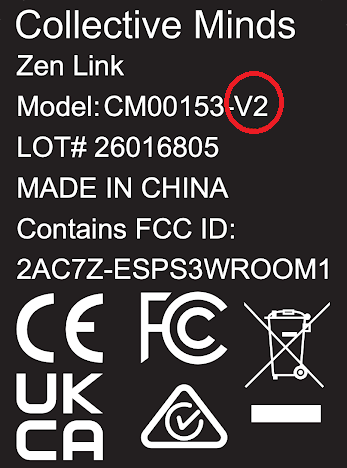
You can tell which version you're using from the label on the bottom of the device.
The image below shows the label from the newer Version 2:
✅ Quick Recap
- Zen Link is the hardware bridge that enables native PS5 connectivity
- It's required for PS5 Native Mode (no Remote Play, no secondary PC)
- Check the label on the bottom to confirm you have Version 1 or Version 2 before setup