Key Guide
Some premium scripts require a challenge key before they run. This guide shows you how to read the key from your Zen, get a response code from the Discord bot, and unlock your script

Some premium scripts verify your device with a quick challenge–response check before they run. When this happens, your Zen screen displays a challenge key. Completing the check takes under a minute.
Tip - Before You Start
You'll need your Cronus Zen with the script loaded, and access to the Asgard Scripts Discord server. The /key command works in any text channel.
1. Read the Challenge Key
When the script loads for the first time, or after a certain amount of usage, a number appears at the top of the Cronus Zen screen - this is your challenge key.
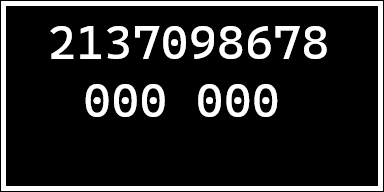
In this example, the challenge key is 2137098678.
2. Submit the key with /key
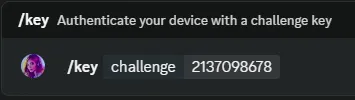
In any text channel of the Asgard Scripts Discord server, type:
/key and press the Space bar or Tab.
When prompted, enter the challenge key exactly as shown on your Cronus Zen screen and then press Enter to send the command.
The bot replies with a response key generated specifically for your device.
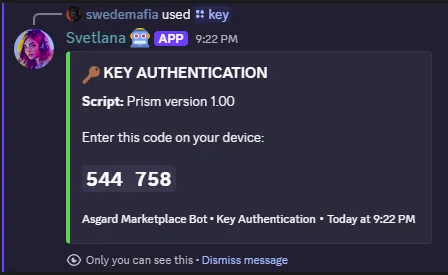
The key in this example is 544758.
3. Enter the response key on your Cronus Zen
Below the challenge key, your Cronus Zen screen shows an entry field:
000 000
Use your controller to enter the bot's response key:
- Up / Down - change the current digit
- Left / Right - move between digits
- A / Cross - submit the code
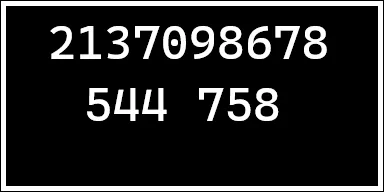
Script Unlocks
If the code is correct, the challenge screen disappears and the script continues loading normally. You won't need to repeat this unless the script asks for a new key.
Entered the Wrong Code?
Simply re-submit the challenge key presented on your Cronus Zen screen to the bot again and carefully enter the response key.
Attempt Limits
Repeated failed key submission attempts may temporarily lock the bot for your account. All key requests are logged, and repeated guessing or attempts to manipulate the key system automatically trigger a cooldown period before you can request another key.
Need Help?
Still stuck? Ask in the #❔︱cronus-help-chat of our Discord server.